Interface Design

The Interface Design section describes how users and system components interact within the Football Player Absence Tracking System.

Data Flow Diagram
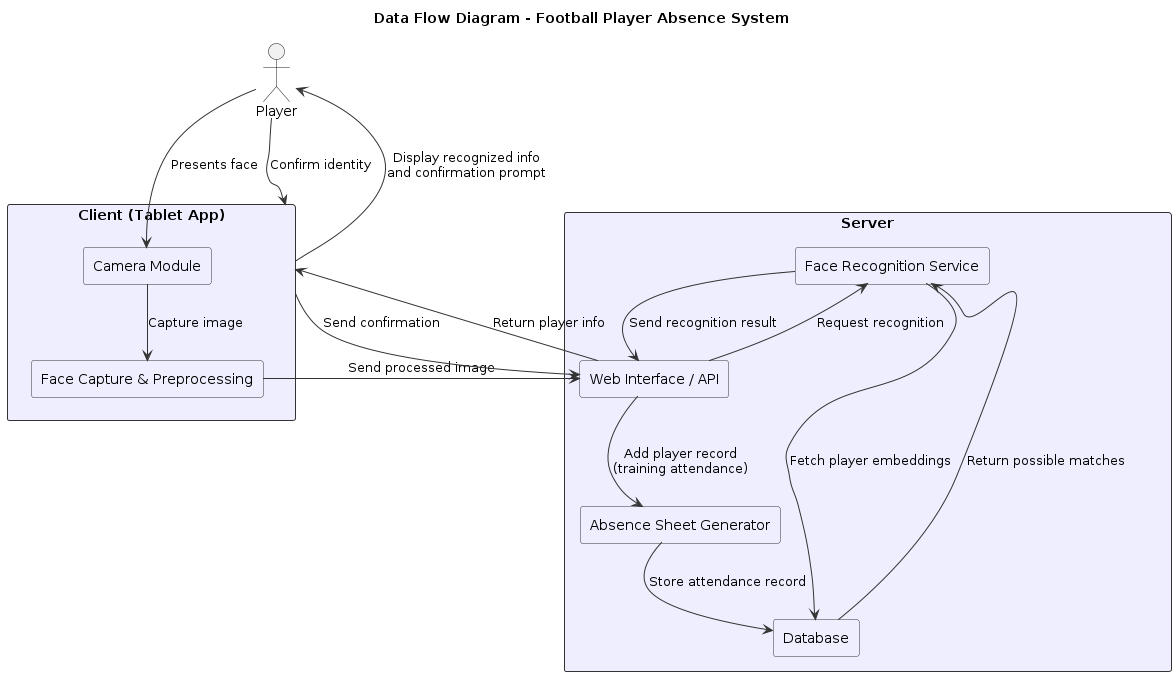
@startuml
title Data Flow Diagram - Football Player Absence System

!define RECTANGLE class
skinparam rectangle {
    BackgroundColor #EEF
    BorderColor #333
}
skinparam arrow {
    Color #333
}

actor "Player" as P
rectangle "Client (Tablet App)" as Client {
    rectangle "Camera Module" as Camera
    rectangle "Face Capture & Preprocessing" as Preprocess
}
rectangle "Server" as Server {
    rectangle "Face Recognition Service" as FaceRec
    rectangle "Database" as DB
    rectangle "Web Interface / API" as API
    rectangle "Absence Sheet Generator" as Sheet
}

P --> Camera : Presents face
Camera --> Preprocess : Capture image
Preprocess --> API : Send processed image

API --> FaceRec : Request recognition
FaceRec --> DB : Fetch player embeddings
DB --> FaceRec : Return possible matches
FaceRec --> API : Send recognition result
API --> Client : Return player info

Client --> P : Display recognized info\nand confirmation prompt
P --> Client : Confirm identity
Client --> API : Send confirmation

API --> Sheet : Add player record\n(training attendance)
Sheet --> DB : Store attendance record

@enduml

Data Model Design

players

Field

Type

Description

id

INT (PK)

Unique player ID

name

TEXT

Player’s full name

team

TEXT

Team or group name

image_url

TEXT

Path to stored face image

face_encoding

BLOB/JSON

Serialized facial embedding

created_at

DATETIME

Registration timestamp

attendance

Field

Type

Description

id

INT (PK)

Unique record ID

player_id

INT (FK)

Reference to players table

timestamp

DATETIME

Recognition time

status

TEXT

Example: “Present”

session_id

TEXT

Optional session identifier