High-Level Design
The High-Level Design section provides an overview of the system’s core architecture and component interactions, describing how the main modules work together to achieve automated attendance tracking through face recognition.
Deployment
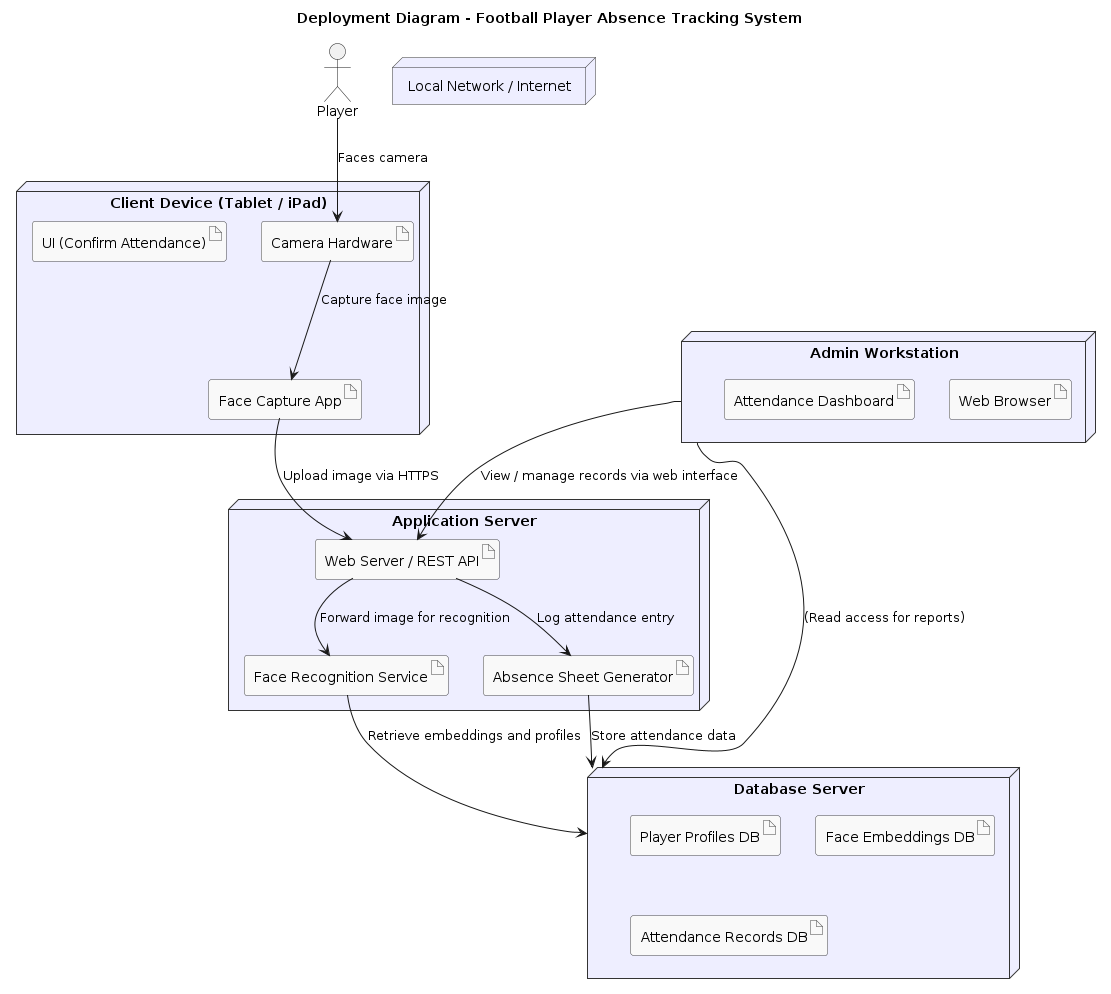
The Deployment Diagram – Football Player Absence Tracking System illustrates how the system’s components are distributed across different hardware and network environments to support automated attendance tracking through face recognition. It shows the interaction between the client device (a tablet or iPad equipped with a camera and face capture application), the application server hosting the web API, face recognition service, and absence sheet generator, and the database server responsible for storing player profiles, face embeddings, and attendance records. The admin workstation provides a web-based dashboard for managing and reviewing attendance data.
Communication flows primarily through secure HTTPS connections over a local network or the internet. Overall, the diagram demonstrates how each part of the system collaborates to capture player images, recognize identities, and record attendance seamlessly.
Interaction
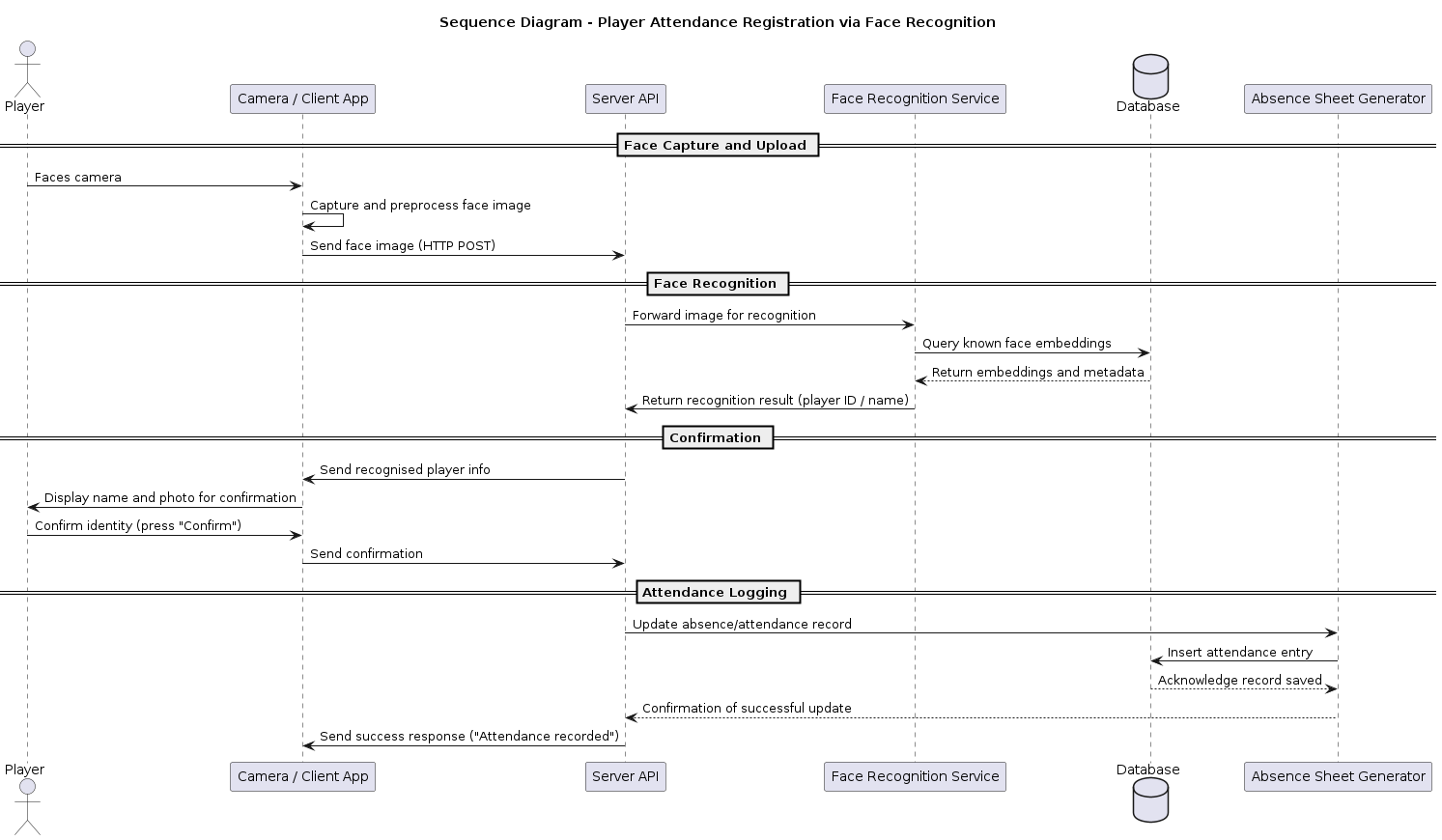
The Sequence Diagram – Player Attendance Registration via Face Recognition depicts the step-by-step interaction between system components during the attendance recording process. It begins with the player facing the camera on the client device, where their image is captured and preprocessed before being sent to the server.
The server forwards the image to the Face Recognition Service, which queries the database to match the player’s facial features with stored embeddings and returns the identification result. The server then sends the recognized player information back to the client, prompting the player to confirm their identity. Once confirmed, the server updates the attendance record through the Absence Sheet Generator, which stores the data in the database.
Finally, the server notifies the client that the attendance has been successfully recorded. This diagram clearly outlines the logical flow of data and interactions required to ensure accurate and automated attendance registration.
Technology Stack
Layer |
Technology |
Reason |
|---|---|---|
Frontend (Client) |
React / HTML5 + JS |
Fast iteration and camera access |
Backend (API) |
FastAPI (Python) |
Lightweight, async, ML-friendly |
Face Recognition |
|
Established, accurate, easy to use |
Database |
SQLite / PostgreSQL |
Lightweight → scalable |
Storage |
Local FS / MinIO |
For player images and exports |
Export |
Pandas + openpyxl |
Easy Excel/CSV generation |
Deployment |
Docker Compose |
Modular and portable |
Module Breakdown
Module |
Responsibilities |
Technology Options |
|---|---|---|
Client Application |
Capture player face, send image, display match result, confirm attendance |
React, Vue, or HTML5 + JS |
Recognition Service |
Extract embeddings, match against database embeddings |
Python + |
Player Management API |
CRUD for players, embedding storage |
FastAPI + SQLAlchemy |
Attendance Logging API |
Record attendance entries |
FastAPI + SQLite/PostgreSQL |
Data Exporter |
Generate Excel/CSV reports |
Pandas + openpyxl |
Admin Dashboard |
Manage players and attendance data |
React or Streamlit |
Database Layer |
Persistent storage for players and logs |
SQLite (dev), PostgreSQL (prod) |
Object Storage |
Store face images |
Local FS or MinIO/S3 |
Security and Privacy
Use HTTPS for all client–server communication.
Store embeddings instead of raw face images where possible.
Obtain player consent before registration (GDPR compliance).